
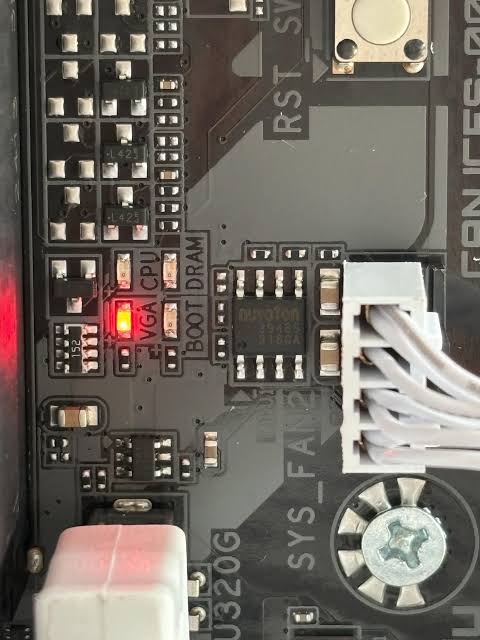
Your PC powers on, the fans spin, the monitor stays black, and a small light labeled VGA stays lit on the motherboard. That light is the board telling you exactly where startup stopped: it couldn’t get the graphics working.
The light narrows the problem down a lot. But “graphics” covers the card, its power, the slot, the cable, and the motherboard’s settings, so here’s how to work through them.
What the VGA light actually means
Most modern motherboards from ASUS, MSI, Gigabyte, and ASRock have four debug lights: CPU, DRAM, VGA, and BOOT. During startup they light up one at a time as each part checks in. If startup gets stuck, the light stays on at the step that failed. A solid VGA light means the processor and memory checks passed, but the board couldn’t start a graphics output.
Stuck on a different light? See what each motherboard light means. No debug lights at all, just a black screen? Start with our no-display checklist.
The most common causes
- Missing or loose graphics card power. The card needs its own power cables from the power supply, often two or three 8-pin connectors or a single 16-pin. Any missing or partly seated connector can trigger the VGA light.
- The card isn’t fully seated. The latch at the end of the slot should click shut. Heavy cards sag, and shipping or moving a PC can work the card partly out of its slot.
- A riser cable on a vertical GPU mount. Vertical mounts use a ribbon cable between the slot and the card. A damaged or incompatible riser is a frequent cause of a VGA light, especially with newer PCIe 4.0 and 5.0 cards.
- BIOS settings that don’t match the card. An outdated motherboard BIOS, or legacy boot support (CSM) turned on, can stop a newer card from starting. A BIOS update or reset often clears it.
- The monitor cable or port. Some boards light VGA when they can’t detect a display at all. A bad cable or dead port on the card can do it.
- A failed graphics card or damaged slot. Less common, but it happens, especially after a power surge or a rough trip in shipping.
What you can safely check yourself
- Shut down, unplug, and push each graphics card power connector in firmly. On a 16-pin connector, make sure there’s no gap at all. A partly inserted 16-pin connector can overheat and melt.
- If your power supply came with separate cables for each 8-pin plug on the card, use separate cables rather than one cable with two plugs daisy-chained on it.
- Check that the slot latch is closed and the card sits level, not drooping at the far end.
- Try a different monitor cable and a different output on the card.
- If you use a vertical mount and you’re comfortable doing it, move the card into the main motherboard slot to take the riser cable out of the equation.
Stop there. Clearing the BIOS, flashing an update, or testing with a second graphics card are the next steps, and a BIOS update that fails partway can turn a VGA light into a dead board.
When to stop and bring it in
If the light stays on after the checks above, the real question is whether the card, the slot, the power supply, or the board is at fault. Answering that properly means testing with known-good parts, which is exactly what we have on the bench. Our technicians build gaming PCs, and a VGA light is one of the most common no-start faults we trace.
The diagnostic is $60, with a written quote within 24 hours or the diagnostic is free. Most gaming PC repairs run $120–$350, plus the part if one has failed. You approve the price before any work starts.
Not in the Kansas City area? Ship it to our Blue Springs bench from anywhere in the U.S. If you’re comfortable removing a large graphics card, pack it separately in an anti-static bag. Our packing guide walks through it step by step.
Common questions
Not usually. Loose power cables, a card that isn’t fully seated, a riser cable, or a BIOS setting cause it more often than a failed card.
Yes. If the power supply can’t deliver what the card needs, or one of its graphics card cables has failed, the card may not start and the board lights VGA.
The most common reasons are a power connector that isn’t fully seated, a card that isn’t locked into the slot, or a motherboard BIOS that’s too old for the new card.
The diagnostic is $60 with a written quote within 24 hours. Most gaming PC repairs run $120–$350, plus the cost of any failed part, and you approve the price first.