
If you’re reading this with a towel in one hand: power it off. Hold the power button until everything goes dark, unplug the charger, and don’t turn it back on to “check if it’s okay.” Now the longer version.
Liquid doesn’t kill laptops on contact. What kills them is electricity flowing through wet circuits — that’s when things short — and the corrosion that starts in the hours and days after. Both of those are exactly the things the first ten minutes control, which is why two identical spills can end so differently. The hardest version of this we’ve seen: a customer editing vacation photos with her grandkids knocked a cup of water across her MacBook Pro. Nothing happened at first — so she kept working. A few minutes later it shut down, restarted itself, and that was the machine’s last act. By the time it reached our bench, the board damage was done, and because no backup had ever been set up, the photos went with it. Not because she was careless — because “it still works” felt like the danger had passed. It hadn’t. It never has.
The first ten minutes
Power off completely and unplug. Not sleep — off. If your laptop has a removable battery, take it out.
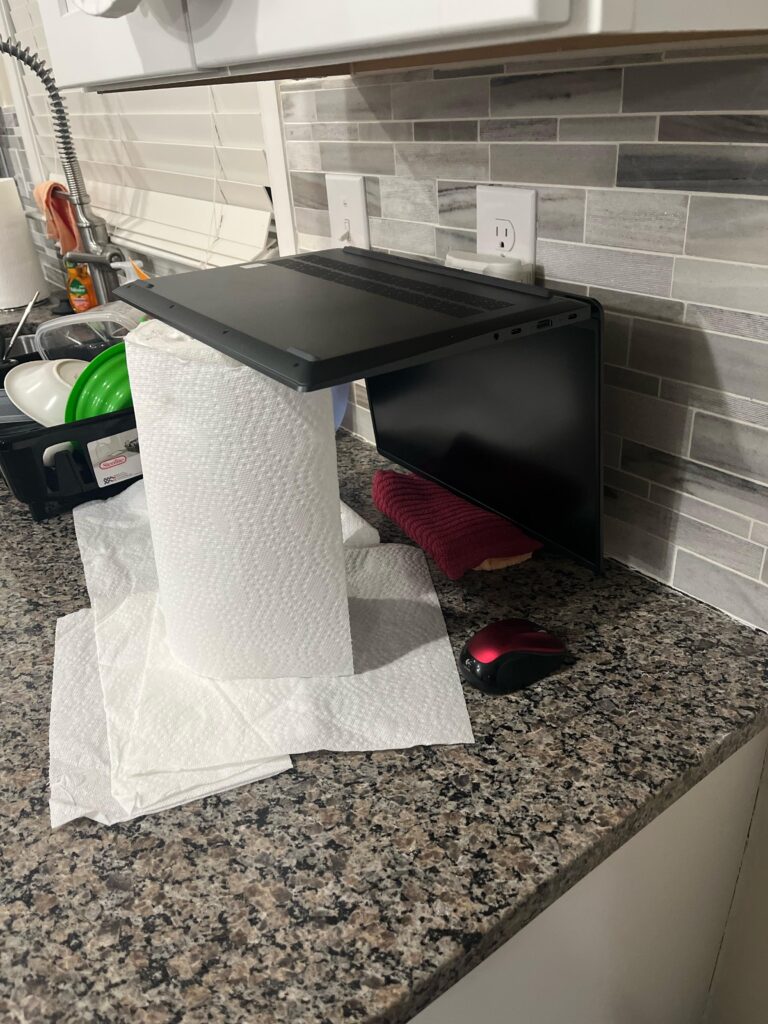
Flip it. Open the lid to a right angle and turn the whole machine upside down, like a tent, on a towel. Gravity should pull liquid away from the board, not deeper into it.
Disconnect everything — USB drives, mouse, SD cards.
Don’t shake it, don’t hair-dry it hot, and don’t turn it on to test it. Every restart with moisture inside is another spin of the wheel, and heat pushes liquid where it hasn’t been yet.
About the rice
Skip it. Rice pulls moisture from the air vaguely and slowly; it does nothing for liquid already sitting under a keyboard or on a motherboard — and the days a laptop spends buried in rice are exactly the days corrosion needs. Rice mostly works as a way to feel proactive while the real damage sets in.
Why what you spilled matters
Plain water is the best case. Coffee, tea, soda, and anything sugary leave conductive, corrosive residue that keeps working after everything feels dry. Sugary spills almost always need professional cleaning even if the laptop seems fine — “seems fine” and “has residue etching traces off the board” overlap for weeks.
The move that actually saves machines
Speed to a bench. A liquid-damaged laptop opened, cleaned, and dried properly within a day or two has a genuinely good survival rate; the same laptop turned back on and used for a week often doesn’t. We open it, clean the residue, assess what the liquid reached, and give you a written quote within 24 hours — including an honest read on the data, which nearly always survives even when hardware doesn’t. If you’re anywhere near Blue Springs with a wet laptop, call before you drive and we’ll fit the drying window: (816) 708-8822.
Outside the Kansas City area? Ship it to our bench with mail-in computer repair: same $60 diagnostic, insured return shipping. Related guide: Laptop won’t turn on? What to check first