
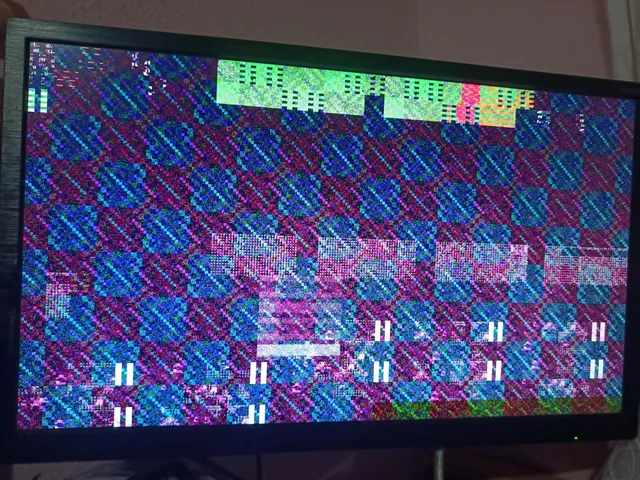
The game freezes, the screen goes black for a few seconds, or you get kicked to the desktop with a “display driver stopped responding” message. Sometimes it happens every session, sometimes once a week. GPU crashes are frustrating because the same symptom can come from a five-minute driver fix or a graphics card on its way out.
The goal is to figure out which one you have before you spend money on parts.
Read the symptom first
| What happens | What it usually points to |
|---|---|
| Game closes to the desktop with an error, PC keeps running | Usually software: the game, the driver, or an overclock. |
| Screen goes black for a few seconds, then comes back | Windows reset the graphics driver after it stopped responding. Driver, overclock, or power. |
| The whole PC freezes and needs a hard reset | The graphics card, unstable memory, or overheating. |
| PC shuts off or restarts instantly mid-game | Usually power or heat, not drivers. |
| Colored blocks, lines, or flickering textures (artifacts) | A strong sign of failing graphics memory or an overheating card, especially if it shows up outside of games too. |
The most common causes, in order
- Driver problems. A bad driver update, leftovers from an older driver, or switching between NVIDIA and AMD cards without cleaning out the old driver.
- Factory or forgotten overclocks. Many cards ship overclocked from the factory, and some become unstable at those speeds as they age. Tools like MSI Afterburner can also leave an old overclock applied that you’ve forgotten about.
- Power delivery. Modern graphics cards pull brief power spikes well above their rated draw. A power supply that’s undersized, aging, or connected with one daisy-chained cable can make the card crash under load.
- Heat. Dust, dried-out thermal paste or pads, or a failing fan can push the card’s hotspot or memory temperature high enough to crash, even when the main GPU temperature looks fine.
- The card itself is failing. Artifacts, crashes in every game, and crashes even at reduced clock speeds all point toward hardware.
What you can safely check yourself
- Update the game and Windows, then do a clean driver install. Download the latest driver directly from NVIDIA, AMD, or Intel and choose the clean or factory-reset install option.
- Reset any overclock or undervolt in MSI Afterburner or AMD Adrenalin back to defaults. If your card has a BIOS switch with a quiet or silent mode, try that mode.
- Watch temperatures while you play with a free monitoring tool such as HWiNFO. Note the GPU temperature, hotspot, and memory junction temperature right before it crashes.
- If your card has two or three power plugs, give each one its own cable from the power supply rather than one cable with two plugs on it.
- Check Windows Event Viewer around the time of the crash. Repeated “display driver stopped responding” warnings point toward drivers or stability. A Kernel-Power error with no driver warnings points toward power.
If a clean driver and default clocks fix it, you’re done. If the crashes continue, or you see artifacts, stop there and don’t keep pushing the card.
When to stop and bring it in
Bring it in when crashes survive a clean driver install and default settings, when you see artifacts, or when you can’t tell whether it’s the card or the power supply. That last one is the expensive guess. People replace a graphics card when the real problem was the power supply, or the other way around. We test under real gaming load with known-good parts, so the quote names the part that actually failed.
The diagnostic is $60, with a written quote within 24 hours or the diagnostic is free. Most gaming PC repairs run $120–$350, plus parts if a component has failed. You approve the price before any work starts.
If your PC turns off completely instead of just crashing the game, read why a gaming PC turns on, then shuts off. If you’re getting no picture at all, start with our no-display checklist.
Not in the Kansas City area? Mail-in gaming PC repair works from anywhere in the U.S., with insured return shipping.
Common questions
Artifacts like colored blocks, lines, or flickering textures, crashes in every game even with a clean driver and default settings, and crashes outside of games are the strongest signs. One game crashing is usually software.
Yes. Modern graphics cards draw short power spikes far above their rated wattage. A power supply that’s undersized, aging, or connected with one daisy-chained cable can cause crashes or shutdowns under load.
If the crashes started right after a driver update, rolling back to the previous version is a reasonable test. Use a clean install either way.
The diagnostic is $60 with a written quote within 24 hours. We test under real gaming load, and you approve the price before any repair starts.