
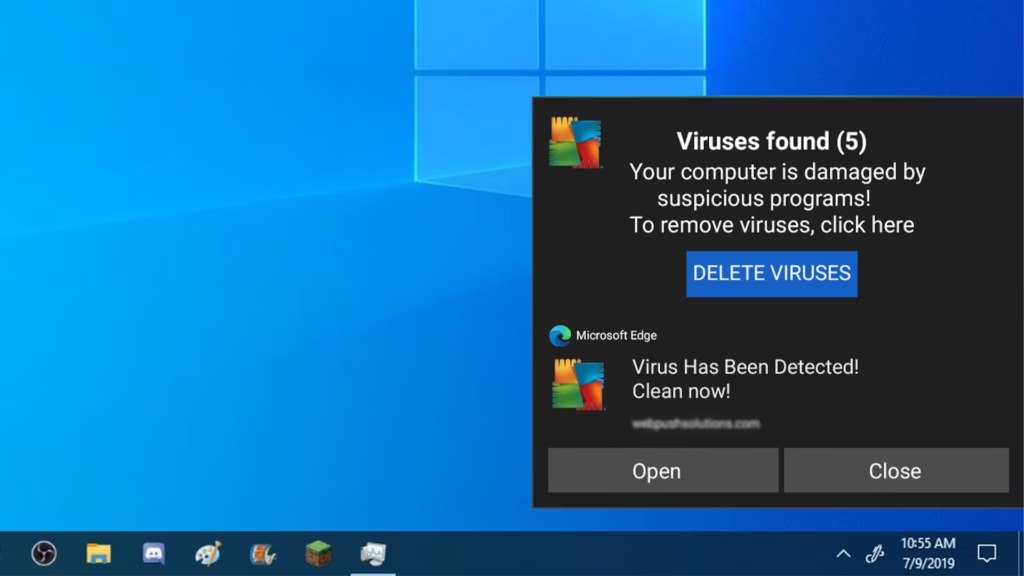
A warning fills your screen. An alarm might be blaring through your speakers. It says your computer is infected, your files are at risk, your banking passwords have been stolen — and it gives you a phone number to call for help.
Do not call the number. That warning is not from Microsoft, Apple, or any antivirus company. It is a scam, and the phone number is the entire point of it.
We handle virus and malware removal in Blue Springs for a flat $130, and machines that ran into this exact scam come across our bench every single week. Here’s how it works, what to do right now, and — if you already called the number — how to limit the damage.
The one rule that defeats every version of this scam
Real virus warnings never include a phone number. Not Microsoft’s, not Apple’s, not Norton’s, not anyone’s. No legitimate technology company puts a phone number in a security alert, and none of them will ever call you about a virus. The moment a warning asks you to call someone, you know everything you need to know.
That rule holds no matter how convincing the rest looks — official logos, a countdown timer, your IP address on screen, a robotic voice announcing that your computer has been locked. All of it is theater built around getting you to dial.
What the fake virus warning actually is
In most cases, it’s just a web page — a malicious ad or hijacked site designed to look like a system alert. It goes full-screen, hides your browser controls, plays alarm sounds, and sometimes shows a fake “scan” finding dozens of infections. The scariest-looking version often means nothing is actually installed on your machine at all.
The scam begins when you call. The person on the phone — claiming to be Microsoft, “Windows Support,” or your bank’s security team — will ask to connect to your computer remotely, run fake diagnostics that “confirm” the infection, and then charge hundreds of dollars to fix a problem that never existed. Worse, the remote-access software they install is real, and it stays.
What to do right now
If the warning is on your screen: don’t click anything inside it, including its own “Close” or “X” buttons — those can trigger downloads. Close the browser entirely. On Windows, press Ctrl+Alt+Delete, open Task Manager, and end the browser. On a Mac, press Command+Option+Esc and force quit it. When you reopen the browser, don’t restore the previous tabs.
If it comes back every time you browse: something is installed — typically a browser hijacker or adware. That’s no longer a fake warning; it’s a real infection, and it’s a flat $130 to remove it and verify the machine clean.
If you already called the number
You’re not alone — this scam succeeds constantly, against smart people, because it’s engineered to cause panic. What matters now is moving quickly, in this order:
If they connected to your computer remotely: disconnect it from the internet and stop using it — especially for banking or email. Remote-access tools they install keep working after the call ends. Bring the machine in; we remove whatever they left behind and verify the machine is clean before it goes home.
If you paid them: call your bank or card company now and report the charge as fraud — most banks reverse these when reported promptly. If you paid with gift cards, report it to the card issuer immediately; recovery is harder, but speed helps.
If they saw or asked for passwords: change your email password first, from a different device — email is the master key to every other account. Then banking, then the rest.
Either way: report it at reportfraud.ftc.gov. It takes five minutes and helps shut these operations down.
Send this to someone before they need it
These scams are aimed squarely at people who don’t live on their computers — which is why the most effective defense is a family member forwarding this article before the pop-up ever appears. One sentence is enough to remember: a virus warning with a phone number is always a scam.
And if a machine in your family has already met one of these — pop-ups that won’t stop, a mysterious “support” call, software nobody remembers installing — book a drop-off. Flat $130, enterprise-grade removal, verified clean before pickup, and we’ll show you what let it in so it doesn’t happen twice.
Outside the Kansas City area? Ship it to our bench with mail-in computer repair: same $60 diagnostic, insured return shipping. Related guide: Computer running slow? The real causes