
our computer takes three minutes to boot. Programs hang. The fan runs while you wait for a browser tab to load. So you’re weighing two options: spend $600 to $1,200 on a new computer, or spend a few hundred fixing this one.
Here’s the honest answer from a shop that does both: if your computer is under six or seven years old, an SSD upgrade usually delivers most of a new computer’s speed at a fraction of the price. We do computer upgrades in Blue Springs starting at $250 for an SSD with your complete system — files, programs, and settings — migrated over. This post is the math behind that recommendation, including the cases where the answer is no.
Why your computer is slow (it’s probably not what you think)
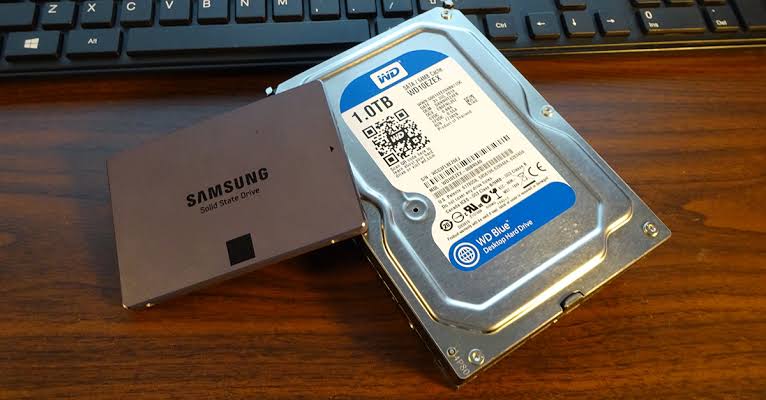
In most slow computers more than a few years old, the bottleneck isn’t the processor or a “full” hard drive — it’s the mechanical hard drive itself. A traditional hard drive reads data with a physical arm sweeping across spinning platters, the same fundamental design as a record player. Every boot, every program launch, every file open waits on moving parts.
A solid-state drive (SSD) has no moving parts and reads data ten to twenty times faster. Swapping the mechanical drive for an SSD attacks the exact thing making the machine feel old — which is why it’s the single most transformative upgrade a computer can receive.
What an SSD upgrade actually changes
- Boot time drops from minutes to seconds — typically 15 to 30 seconds to a usable desktop.
- Programs open near-instantly instead of bouncing in the taskbar while the drive grinds.
- The whole machine feels responsive — file browsing, saving, switching between programs — because nearly everything a computer does touches the drive.
- Reliability improves. No moving parts means nothing to mechanically wear out, and no platters to fail the way aging hard drives eventually do.
What it doesn’t change: an SSD won’t make a ten-year-old processor render video faster or run modern games. It removes the storage bottleneck. For everyday use — browsing, email, documents, photos — the storage bottleneck is usually the only one that matters.
The math: SSD upgrade vs. new computer
A quality replacement for an everyday Windows machine runs $600 to $1,200 — plus the hours of setting it up, reinstalling programs, hunting down license keys, and moving your files.
Our SSD upgrade starts at $250 with a drive up to 1TB, installation, and full migration included: your files, your programs, your settings, exactly where you left them — the machine just boots like it’s new. Every part we install carries a one-year warranty, and the work carries our six-month guarantee.
For a five-year-old computer that’s structurally fine but painfully slow, that’s most of the benefit of a new machine for roughly a quarter to a third of the cost — with zero setup time.
When an upgrade is not worth it
An honest recommendation has to include the no cases:
- The machine is 8+ years old. At that age the processor and motherboard are often bottlenecks too, and money spent upgrading is better put toward replacement.
- The hardware has other failures. A failing screen, damaged board, or dying power circuit changes the math.
- Your needs outgrew the machine. If you’ve started editing video or gaming seriously on a basic laptop, no storage upgrade closes that gap.
- The drive is already failing. That’s a different conversation — potentially a data recovery conversation — and it needs to happen before any upgrade.
This is exactly what the $60 diagnostic exists to settle. You get a written answer within 24 hours: what’s slowing your machine, what an upgrade costs, and — if it isn’t worth doing — the quote says so plainly and you’ve spent $60 to avoid wasting $250.
The 30-second self-check
Press the power button and time it to a usable desktop. Over 90 seconds on a machine under seven years old, and you’re almost certainly looking at a mechanical hard drive that an SSD would transform. While it boots, listen: soft clicking or grinding from the case means the drive may be failing, not just slow — bring it in sooner rather than later, and mention the noise when you do.
Either way, the path is the same: book a drop-off, $60 diagnostic, written answer in 24 hours. If the machine is worth saving, we’ll save it. If it isn’t, we’ll say so in writing — and we can move everything to its replacement for a flat $150 instead.
Outside the Kansas City area? Ship it to our bench with mail-in computer repair: same $60 diagnostic, insured return shipping. Related guide: Computer running slow? The real causes